
Exploring Cybersecurity, IT & Artificial Intelligence
Where technology meets security and innovation.

Cybersecurity
Cybersecurity focuses on protecting systems, networks, and data from digital attacks.
On this platform, I will show some exanples. Such as :
- Network Security Basics
- Cryptography Fundamentals
- Ethical Hacking Concepts
Risk Assessment
Cyber Threat Analysis
Information Technology (IT)
Information Technology is the backbone of modern digital infrastructure.
Topics include:
Operating Systems (Windows & Linux)
Networking Fundamentals
Cloud Computing Basics
Database Management

PROJECTS SECTION TEXT
This section highlights academic and practical projects I have developed to strengthen my technical knowledge.
First let me explain some basics.
Ports like 80, 443, and 22 are network communication endpoints.
They allow different types of internet traffic to go to the correct service on a server.
Think of it like this:
- IP address = apartment building address
- Port number = apartment number
Service (web, SSH, etc.) = the person inside
Port 80 — HTTP (Web Traffic)
Port 80 is used for HTTP (HyperText Transfer Protocol).
- Used for normal websites
- Data is not encrypted
When you visit a non-secure website, your browser connects to port 80.
⚠ Not secure — data can be intercepted.
Port 443 — HTTPS (Secure Web Traffic)
Port 443 is used for HTTPS (HTTP Secure).
- Encrypted using SSL/TLS
- Used for secure websites
When you see 🔒 in the browser address bar, it means port 443 is being used.
This is the standard for:
- Online banking
- Login systems
- E-commerce
Social media
Port 22 — SSH (Secure Shell)
Port 22 is used for SSH.
SSH allows :
- Secure remote login to a server
- Command-line control of another computer
Secure file transfers (SFTP)
When useful?
Cybersecurity students use port 22 often when:
Managing Linux servers
Accessing cloud machines
Doing penetration testing labs
Why This Matters in Cybersecurity
When scanning a server using tools like Nmap:
Open 80/443 → Web server running
Open 22 → SSH access enabled
Misconfigured SSH → Possible security risk
Attackers look for open ports.
Defenders secure and monitor them.
FIRST PROJECT
Network Scanning Report – Localhost Analysis
Tool Used.
I performed a network scan using Nmap (Intense Scan Profile) to analyze open ports and services running on my local machine (127.0.0.1).
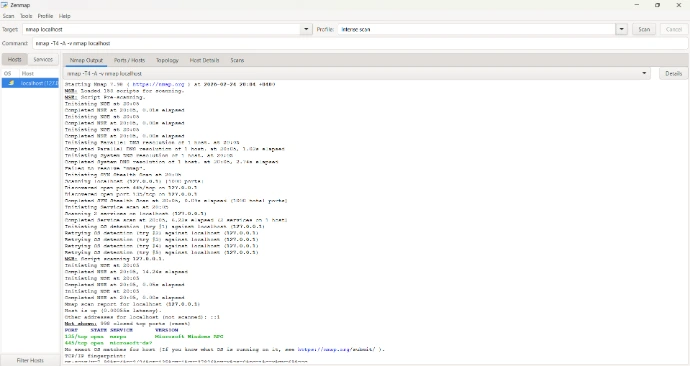
Scan Results
Open Ports Found: 2
135/tcp – MSRPC (Microsoft Remote Procedure Call)
445/tcp – SMB (File Sharing Service)
998 ports were closed
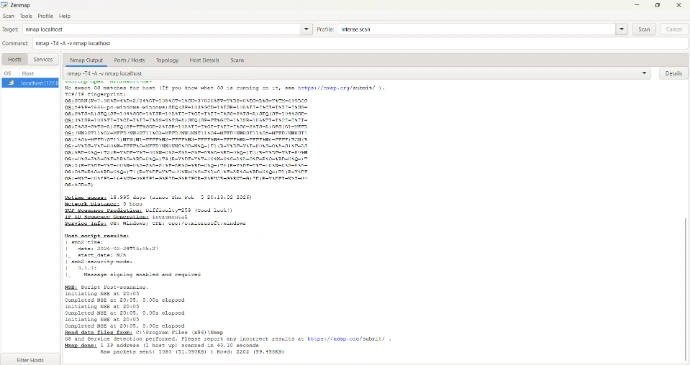
Operating System detected: Microsoft Windows
SMB Version: 3.1.1 (Message signing enabled)
Conclusion
The scan shows that only essential Windows services are running, and no unnecessary ports are exposed. SMB message signing is enabled, which improves security. Overall, the system appears properly configured with minimal network exposure.
SECOND PROJECT
Login System Security:
Plain Passwords vs Hashed Passwords
When users create an account, their password should never be stored in plain text.
Plain Password Example (Insecure):
Username: student1
Password: mypassword123
If a hacker accesses the database, they can immediately see the password.
Hashed Password Example (Secure):
Username: student1
Password: 482c811da5d5b4bc6d497ffa98491e38
This encrypted value is called a hash.
Hashing uses algorithms like:
SHA-256
bcrypt
Why Hashing Matters
Protects user data
Prevents password leaks
Reduces impact of database breaches
Follows cybersecurity best practices
Conclusion: Secure systems always hash passwords before storing them.

THIRD PROJECT
AI-Based Intrusion Detection
Intrusion Detection Systems (IDS) monitor network traffic and detect suspicious behavior.
Traditional systems use rules.
AI systems use anomaly detection.
What is Anomaly Detection?
Anomaly detection means identifying activity that is unusual compared to normal behavior.
Example:
Normal traffic:
50 login attempts per hour
100 MB data transfer
Suspicious traffic:
5,000 login attempts in 2 minutes
10 GB data transfer suddenly
AI flags this as abnormal behavior.
for example
User Activity Analysis:

IP: 192.168.1.5
Login Attempts: 3
Status: Normal

IP: 203.45.77.12
Login Attempts: 450
Status: ⚠ Suspicious Activity Detected
Why AI is Important in Cybersecurity
Detects unknown attacks
Learns from behavior patterns
Reduces false alarms
Improves real-time security monitoring
CERTIFICATIONS SECTION
I continuously improve my technical skills through structured online courses and certifications in Cybersecurity, IT, and Artificial Intelligence. Which are from sources such as Coursera, Alison, HP life, Udemy
- 1. Essentials of IT Service Management and İnfrastructure library level 4
- 2. Artificial Intelligence : Preparing for the Future of Work
- 3. Microsoft Excel 2019 Beginners
- 4. Advanced features of Hadoop Ecosystem
- 5. Data science & Analytics
- 6. IT for business success
- 7. Success mindset
- 8. Effective leadership
- 9. A deep dive into LLM Red Teaming
10. Blue Team (Boot Camp) Defensive security essential training
11. AI for Beginners
12. Critical Thinking in the AI era
My long-term goal is to pursue a Bachelor's degree in Cybersecurity or Computer Science abroad, where I can gain advanced academic training, research exposure, and international experience.
I am particularly interested in combining cybersecurity with artificial intelligence to develop intelligent defense systems against modern cyber threats.
CONTACT SECTION
I am open to academic collaboration, student networking, and technology discussions.
Feel free to connect with me through email.